What is an AI IDE?
AI IDE = AI + Integrated Development Environment (IDE). In traditional IDEs like VS Code and IntelliJ, developers manually write each line of code, consult documentation, and create test cases. AI IDEs allow developers to issue commands in natural language, enabling the AI to understand the entire project structure and automatically complete tasks such as coding, refactoring, debugging, and generating documentation.
Technical Principles: LLM + Agent + Knowledge Indexing
- LLM (Large Language Model): Understands natural language commands and code semantics, generating or modifying code.
- Agent: Breaks down complex tasks into steps (e.g., “first check dependencies → then modify interface → finally write tests”) and executes them autonomously.
- Knowledge Indexing: Establishes an index of the project codebase, allowing the AI to quickly retrieve relevant files and functions instead of scanning line by line.
Key Legal Considerations: Corporate source code, test cases, project architecture, and even comments may be read and processed by AI. The flow of data, its retention, and whether it’s used for training directly relate to trade secrets and data compliance.
Comparison of Claude Code, Cursor, and Codex
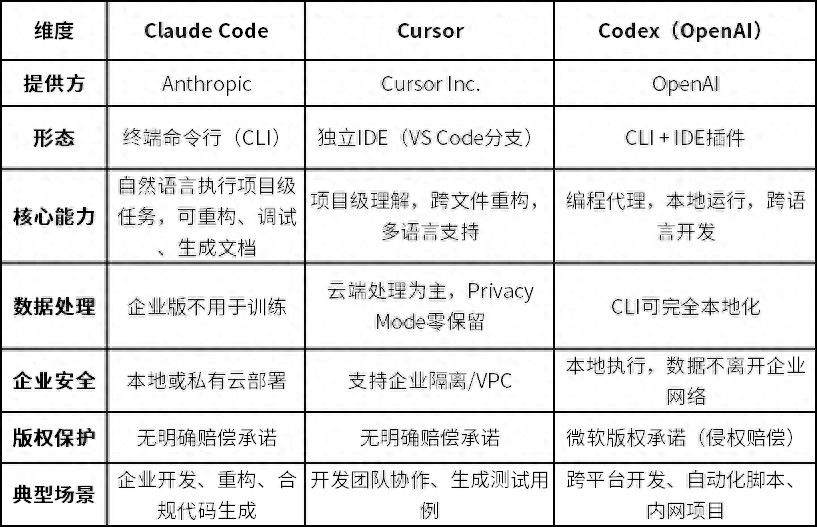
One-sentence Positioning: Claude Code is “the most powerful but requires terminal operation”; Cursor is “the easiest to use and privacy-friendly”; Codex is “the most flexible and can be fully localized”.
Technical Highlights:
- Claude Code: Architecture of LLM + Task Planner + Execution Engine, supports complex tasks via natural language commands. The enterprise version does not upload data for training, ensuring high security.
- Cursor: Project-level understanding, capable of cross-file/module refactoring, generating test cases and documentation. Requires configuration for isolation and permission control for sensitive corporate data.
- Codex: CLI form supports local execution, keeping code within the corporate network. Can integrate with VS Code or other IDEs, supporting cross-language development and automation scripts.
Practical Guide for Legal Professionals Using Claude Code
1. Environment Setup
# Installation (recommended method)
curl -fsSL https://claude.ai/install.sh | bash

# Start in project directory
claude

# Core commands
/clear # Clear context
/cost # View costs
/exit # Exit
System requirements: macOS 10.15+/Linux/Windows (WSL), Node.js 18+, 4GB+ RAM. The enterprise version supports local or private cloud deployment, with configurable Git repository access permissions, operation logs, and audit functions.
2. Common Task Commands for Legal Professionals
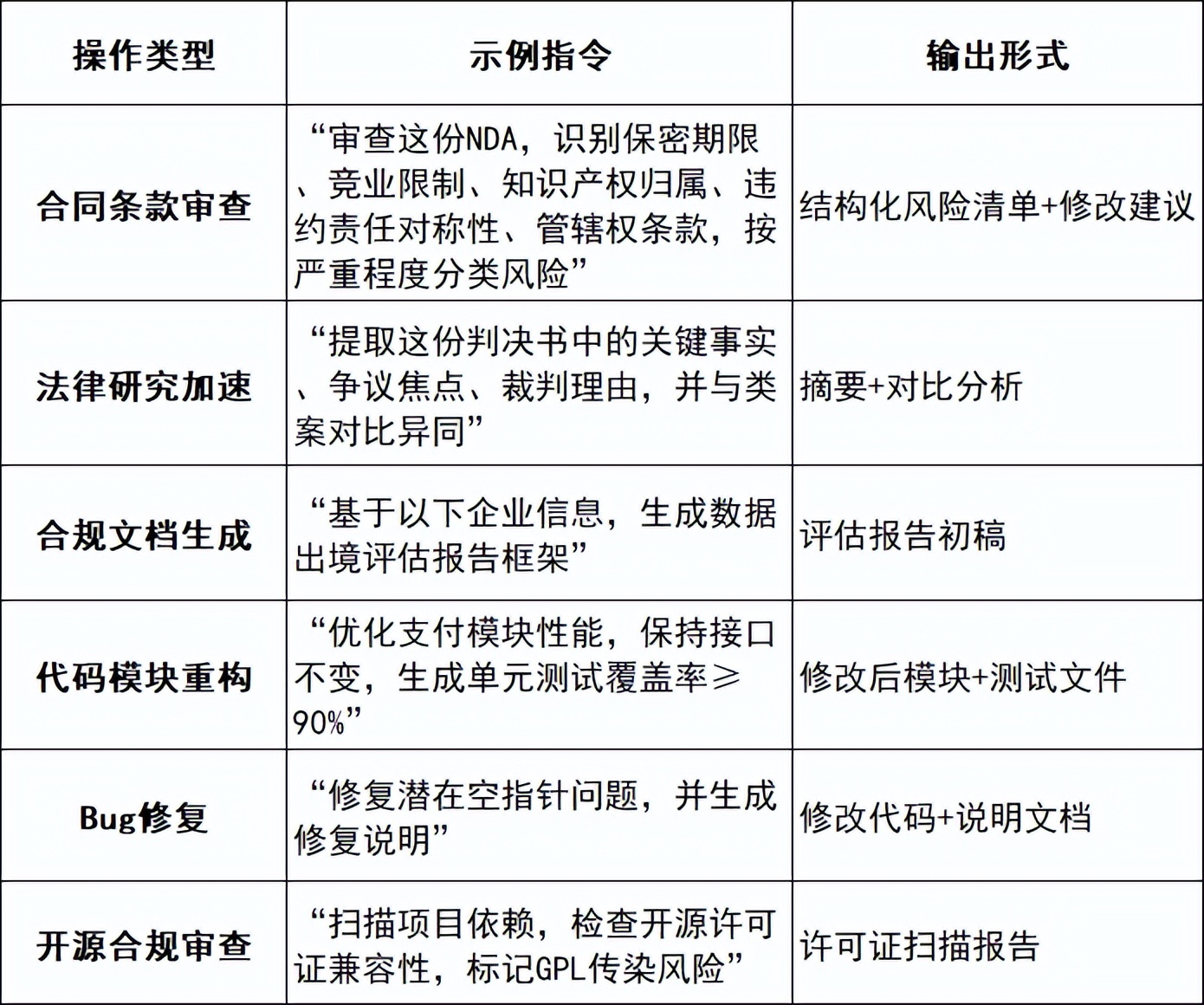
Practical Example: Reviewing an NDA with Claude Code
Step 1: Place the NDA file in the project directory
Step 2: Runclaudeto start
Step 3: Input command: “Review this NDA, identify 5 types of risk points (reasonableness of confidentiality period, non-compete restrictions, intellectual property ownership, symmetry of liability, jurisdiction), categorize by severity, and provide modification suggestions”
Step 4: Claude outputs a structured risk list, marking each item with high/medium/low risk levels
Step 5: Lawyer review—AI outputs must be verified by a practicing lawyer before use.
Red Line: Five types of information are absolutely prohibited from being uploaded: Client identity information, undisclosed case details, core business secrets/source code, personal privacy data, and sensitive information related to national security.
3. Advanced Tasks
- Batch refactor project modules, unify coding standards
- Automatically generate open-source dependency review scripts to check license compliance
- Retrieve functions and documents related to contract review, establishing internal knowledge connections
MCP Protocol: Connecting AI to Legal Databases
One-sentence Understanding: MCP (Model Context Protocol) is the “USB interface” for AI. Without MCP, AI can only respond based on training data; with MCP, AI can connect to legal databases, enabling real-time legal information queries.
Legal Scenario MCP Integration Plan
Write a Legal Search MCP Skill (Minimal Code)
import { McpServer } from '@modelcontextprotocol/sdk/server/mcp.js';
import { StdioServerTransport } from '@modelcontextprotocol/sdk/server/stdio.js';

const server = new McpServer({ name: 'law-search', version: '1.0.0' });

server.tool('search_laws', {
 keyword: { type: 'string' },
 category: { type: 'string', enum: ['civil', 'criminal', 'corporate', 'data'] }
}, async ({ keyword, category }) => {
 const results = await callLawDatabase(keyword, category);
 return { content: [{ type: 'text', text: JSON.stringify(results) }] };
});

await server.connect(new StdioServerTransport());
To configure Claude Code for use: Create a claude.config.json in the project root, specifying the MCP Server path. For debugging, use npx @modelcontextprotocol/inspector.
Security Points: Access to enterprise data via MCP Server must have permission verification; production environments require HTTPS/TLS; all query records must have audit logs; third-party MCP Servers must be reviewed for data security statements.
Legal Risks and Corporate Implementation
1. Is Data Leaving the Country?
The enterprise version of Claude Code can be deployed locally; Cursor’s cloud processing requires confirmation of corporate isolation; Codex CLI can be fully localized. Core Judgment Standard: Whether the code leaves the corporate network to reach overseas servers.
2. Source Code Security
Clarify the usage scope of sensitive modules; version management and log auditing ensure traceability; establish a gradient control strategy of “core code → prohibited upload; commercial code → localization; internal tools → cloud + auditing”.
3. Copyright of AI-Generated Code
Code generated internally using AI tools typically belongs to the enterprise (referencing employment work rules). However, ownership must be clearly defined through contracts, retaining traces of human lawyer contributions. Open-source dependencies must undergo license checks to prevent GPL “infection” of closed-source projects.
4. Contract and Agreement Review (DPA/SLA)
Data Processing Agreements (DPA) must confirm: whether data is used for training, list of subprocessors, data retention periods, and deletion rights. Service Level Agreements (SLA) must confirm: availability commitments, performance metrics, liability limits, intellectual property guarantees, and audit rights.
Corporate Procurement and Compliance Checklist
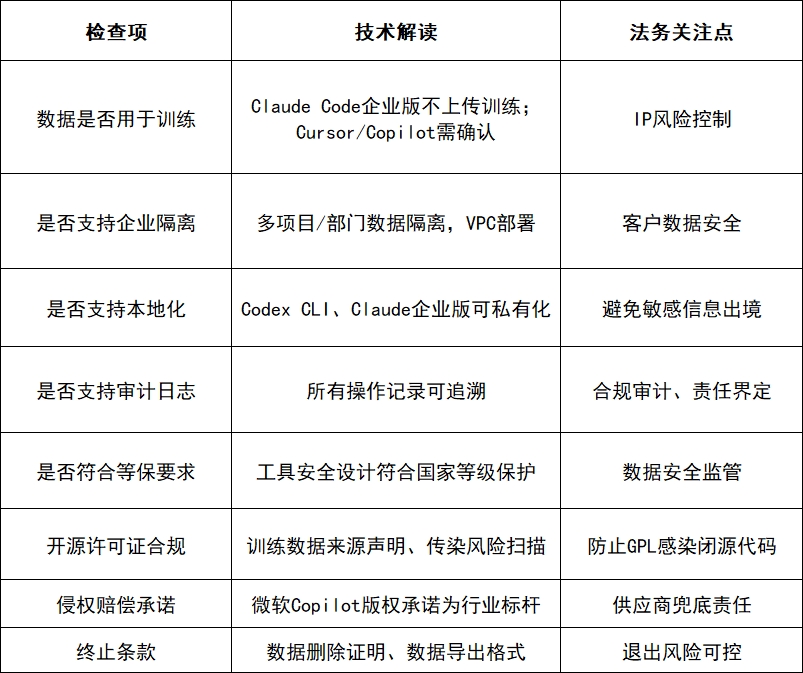
Recommendations for Implementing Claude for Legal
- Key Review Points for Contract Clauses: Data Processing Agreements (DPA), ownership of generated code intellectual property, liability limitation clauses, disclaimers for open-source licenses.
- Internal Policy Development: Clearly define which modules can use AI IDE; establish review and rollback mechanisms for AI-generated code; set boundaries for employee usage.
- Risk Monitoring System: Comprehensive audit logs, traceable version management, automatic checks for open-source dependencies.
- Team Collaboration Model: RAG (Retrieval-Augmented Generation) + Agent (Task Agent) + AI IDE (Development Environment) to build a secure and compliant legal knowledge base and code management process.
Conclusion
Legal professionals do not need to become programmers, but they must understand the workings and risks of AI development tools.
- Technical Understanding: LLM understands semantics, Agent breaks down tasks, Knowledge Indexing retrieves projects, MCP connects to external data.
Legal Implementation: Gradient control of source code security, assessment and declaration of data leaving the country, contract agreements on AI copyright, compliance scanning of open-source licenses.
Corporate Practice: Review of DPA/SLA clauses, deployment of audit logs, formulation of internal usage policies, establishment of a four-party governance committee.
The value of legal services is expanding, not only reviewing contracts but also becoming gatekeepers of AI development safety and compliance. This is the core competitiveness of the next generation of legal services.
Comments
Discussion is powered by Giscus (GitHub Discussions). Add
repo,repoID,category, andcategoryIDunder[params.comments.giscus]inhugo.tomlusing the values from the Giscus setup tool.